
Deposit & Withdrawal
Securities / Stock Options / Futures Deposit & Withdrawal
e-Deposit

Bank Transfer

FPS

PPS

Bill Payment
【Deposit Important Notes】
- 1. After the deposit,clients are required to provide the deposit record and submit to Customer Services Department (refer to【Method of Deposit Notification】).: – Bank deposit slip or “Screenshot” of the online transfer (Please sign on the Bank deposit slip or the “Screenshot” of online transfer and indicate the Client’s name, account number – Cash Deposit for each client is more than HKD30,000 or Cheque Deposit more than HKD50,000 per day. Client must provide Source of fund (e.g. Cheque image showing the name of issuer, Cash Withdrawal Slip, Bank Transaction Statement etc.)
- Please note that the third party deposits are strictly prohibited.
- If client deposit without providing any deposit advice and the identity of the depositor, we reserve the right to obtain information from the account holder to confirm the identity of the depositor. If there is any suspicious transaction found, we will not credit the fund to clients account(s) until your provision of the deposit/ transfer advice to us to prove the identity of the depositor.
- All Deposit Notification received from clients after the daily cut-off time, 4:30pm on each trading day, will be handled on the next working day.
【FPS】
| Delta Asia Securities Limited | ||||
|---|---|---|---|---|
|
FPS ID |
100580760 |
|||
FPS transfer steps:
- Log in to customer online banking
- Select “Transfe” > 「FPS」
- Payee’s Name filled in 「Delta Asia Securities Limited 」 「Bank Account Number / FPS ID」
- Enter [Amount] and [Agree & Submit] the transfer of deposit, and take a screenshot of the deposit record after successful transfer.
【Bank Deposits】
Securities / Stock Options / Futures Accounts
| Payee's Name | Delta Asia Securities Limited | ||||
| Bank Name | Bank A/C No.-HKD | Bank A/C No.-RMB | Bank A/C No.-USD | SWIFT code | Bank Address |
| Banco Delta Asia | 807000016009 | 807000016023 | 807000016011 | DABGMOMX | Largo de Santo Agostinho, Centro Administrativo, em Macau |
| Bank of China (HK) | 012-737-2-019257-7 | 012-737-2-019259-3 | 012-737-2-019258-0 | BKCHHKHH | Bank of China Tower, 1 Garden Rd, HK |
| DBS Bank | 016-001681990 | 016-001681981 | 016-001681954 | DHBKHKHH | 99 Queen’s Rd Central, The Center, Ground Floor, Central, HK |
| Chong Hing Bank | 256-10-349543-4 | 256-19-900486-8 | 256-15-059988-8 | LCHBHKHH | Chong Hing Bank Centre, 24 Des Voeux Road Central, HK |
| BEA (Current A/C) | 015-514-68107609 | 015-514-404136435 | 015-514-68107609 | BEASHKHH | 10 Des Voeux Road, Central, HK |
【PPS】
Clients log in to the PPS account registers the following information for the transfer.
| PPS Information (Securities / Stock Options / Futures) | |
| PPS channels | 1.By Internet: www.ppshk.com 2.By Phone: 18033 |
| Merchant Name | Delta Asia Securities Limited |
| Merchant Code | 9608 |
| Bill Number | Customer's Securities / Stock Options / Futures Account Number |
| Services Registration | Clients need to register as a PPS user first. Clients can bring his/her withdrawal card or credit card with a withdrawal function to the nearest payment terminal to open a PPS account. |
| Deposit Limit | The maximum deposit limit is HK$100,000 per day (depends on the maximum limit of PPS) |
【eDDA Electronic Direct Debit Authorization】- (Applicable for Securities Account
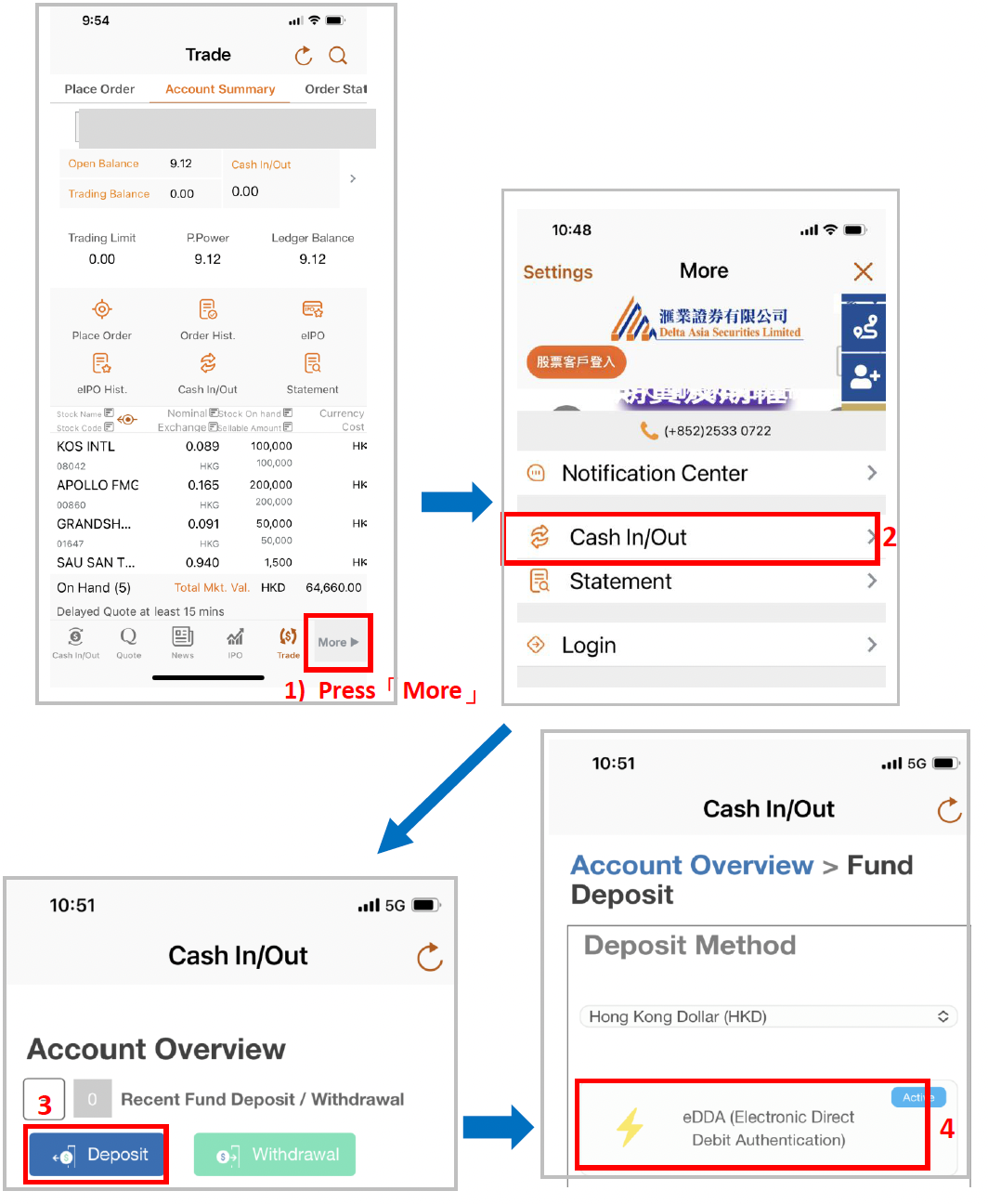
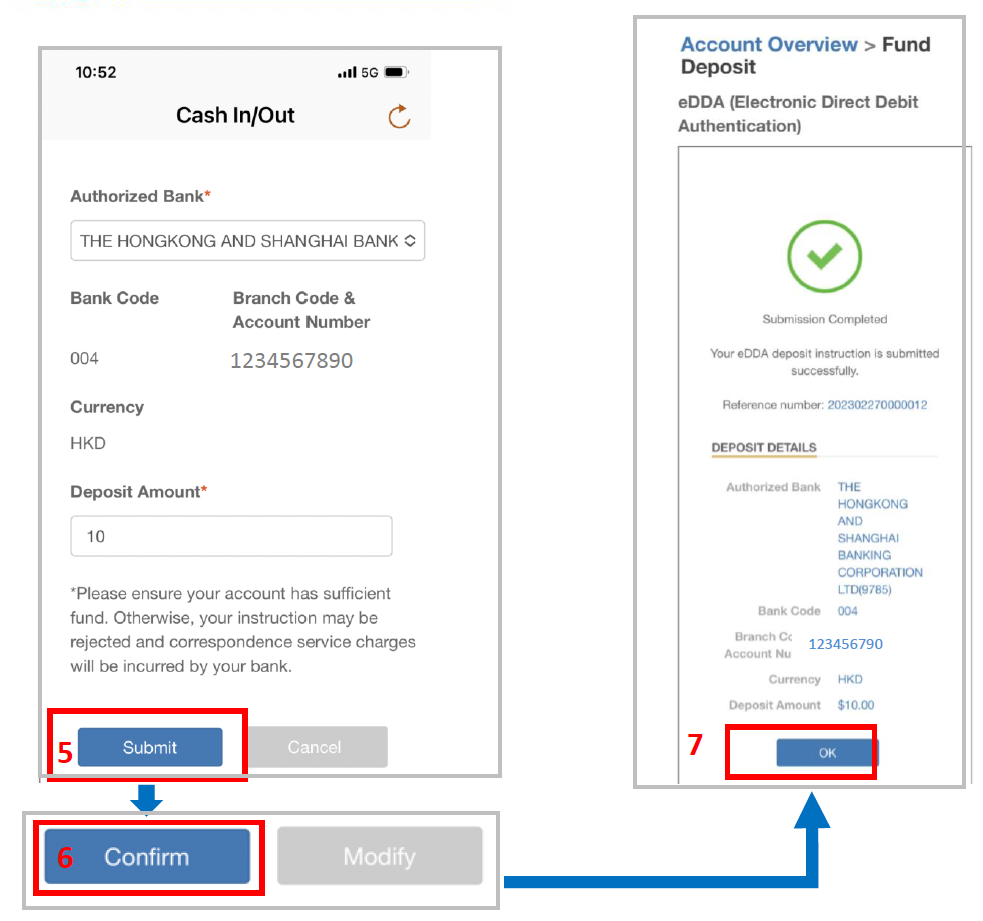
eDDA Deposit is a fast deposit method based on “FPS”. Apart from the authorization via “DAS Invest” or Internal Trading Platform, the client can initiate a deposit in DAS Invest APP or Internal Trading Platform, and the funds will be transferred from the bank account into your Delta Asia account.
eDDA Registration :
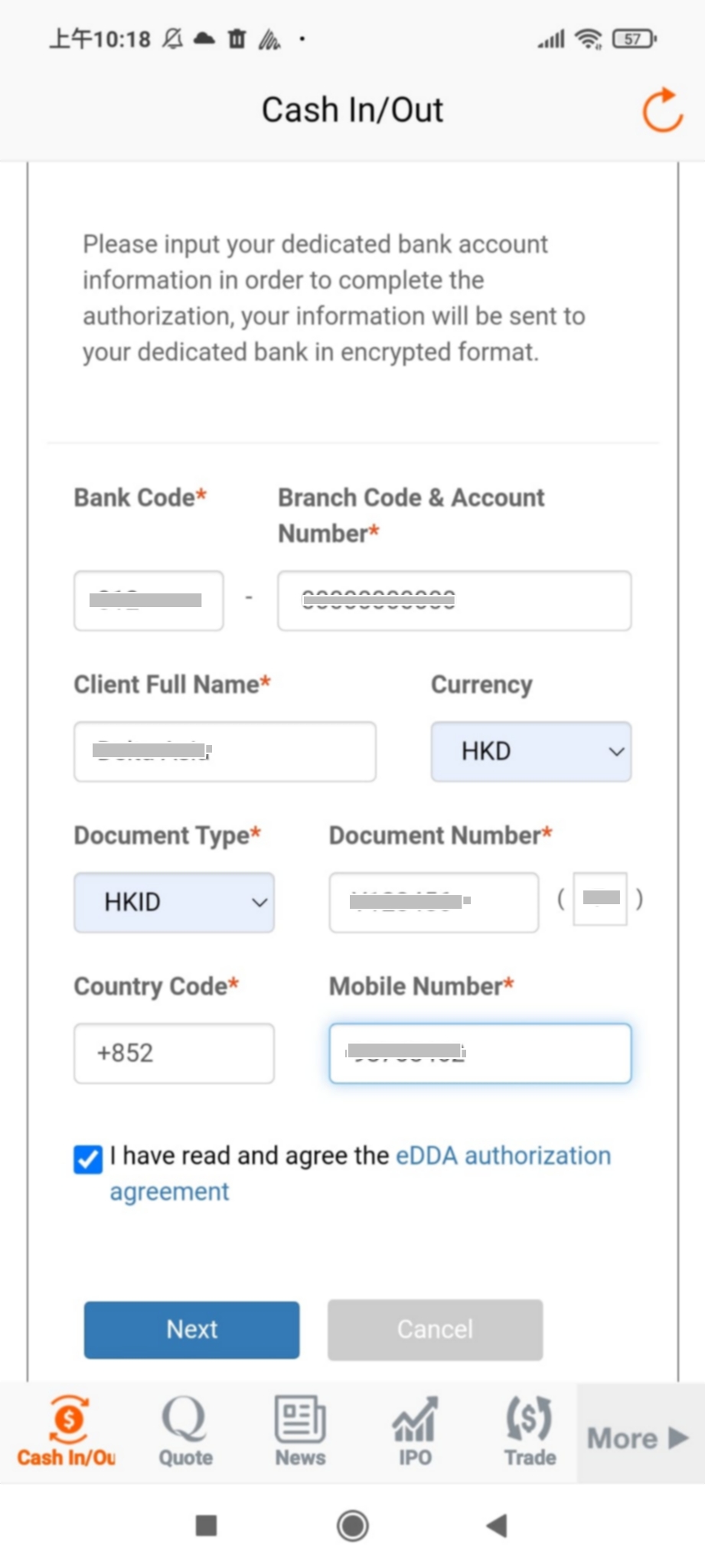
Fill in your dedicated bank account information :
- Bank Code
- Branch Code & Account Number
- Full Name
- Currency
- Document Type – Document Number
- Country Code
- Check the eDDA authorization agreement
Filled all to Next
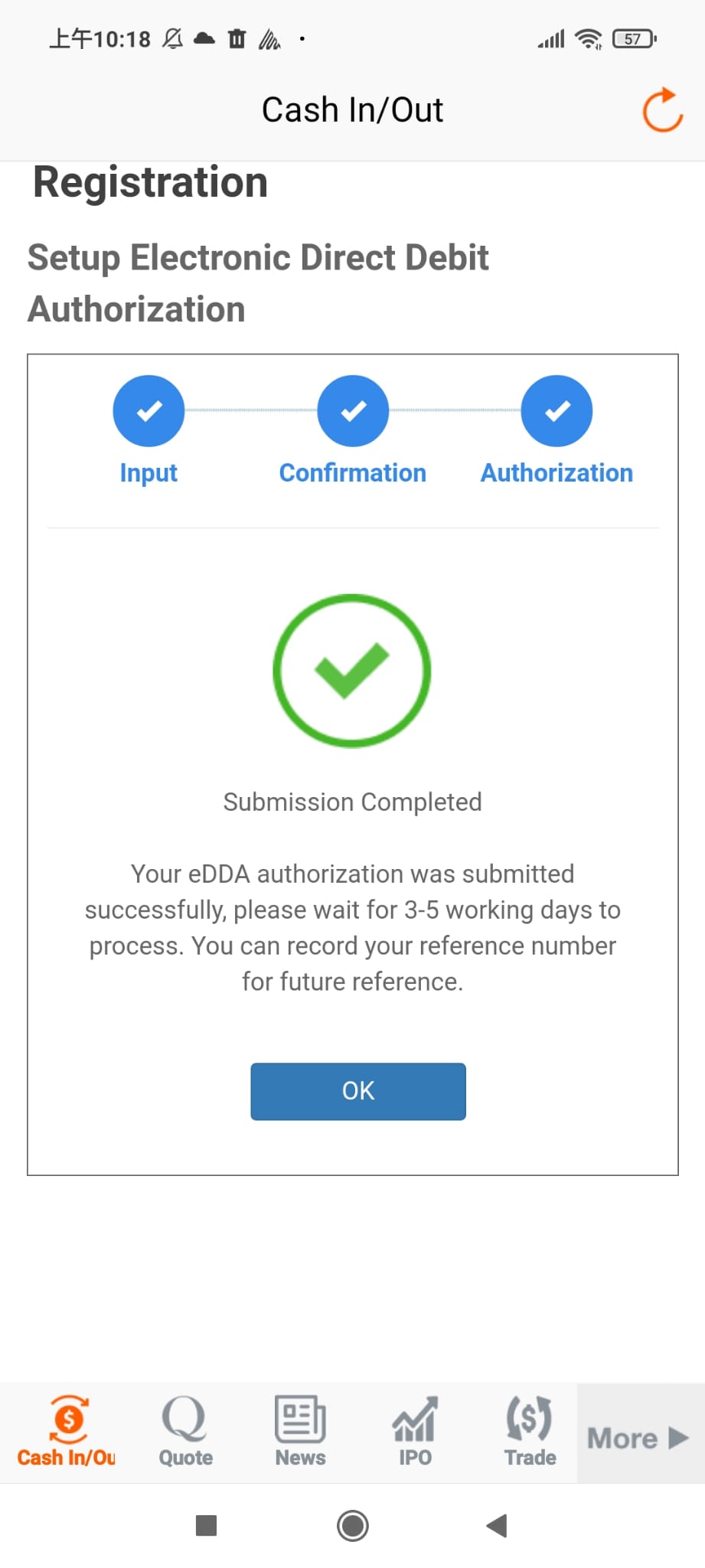
After filling in the information, you will receive a one-time password authentication via SMS; fill in the authentication code in the space and click “Submit” is completed.
eDDA Deposit
【Bill Payment】
Clients log in to online banking and register the following information to pay their bills. (When clients deposit to a merchant for the first time using the bill Payment, please adjust the payment limit of the bank by client himself/herself)
| Bill Payment Information (Securities / Stock Options / Futures Accounts) | |
|---|---|
|
Billing Category |
Securities companies |
|
Merchant Name |
Delta Asia Securities Limited |
|
Bill No. |
Client Securities / Stock Options / Futures Account Number |
Transfer steps:
- Log in to customer online banking
- Select “Pay Bills” – Billing Category “Securities Company”
- Merchant name filled in “Delta Asia Securities Limited”; Bill no. – “Client Securities / Stock Options / Futures Account Number”
- Enter [Amount] and [Agree & Submit] the transfer of the deposit, take a screenshot of the deposit record after the successful transfer.
【Method of Deposit Notification】
Clients can submit a “Deposit” notification and record by the following methods and Client Services Officer will contact you immediately when the message is received.
| Notifications, Submission of Instructions and Record | |
|---|---|
|
WhatsApp |
+852 6218 8000 |
|
WeChat |
DELTASIACS |
|
Hotline |
+852 2533 0722 |
|
Email |
|
|
Visit Us |
Hong Kong Head Office – 5th Floor Luk Kwok Centre, 72 Gloucester Rd, Wan Chai (+852 2533 0800)
|
|
Units 1-4, 9/F, Chow Tai Fook Centre, 580A Nathan Road,
Mongkok, Kowloon
(+852 2533 0818 / 2533 0828 / 2533 0868) |
【 Method of Withdraw Notification】
| Withdrawal Notice | |
|---|---|
|
Customer Service Hotline |
HK +852 2533 0722 / Macau +853 8796 9722 |
|
Email |
Clients should give their withdrawal notifications before the daily cut-off time (Trading day from Monday – Friday, on or before 11am) via the above channels. All late withdrawal notifications will be handled the next working day.